
Author: David
Category: Pet Fence
Brand: Pet Stop
How to Program Ultra-tuff Receiver with an OT-300 Transmitter
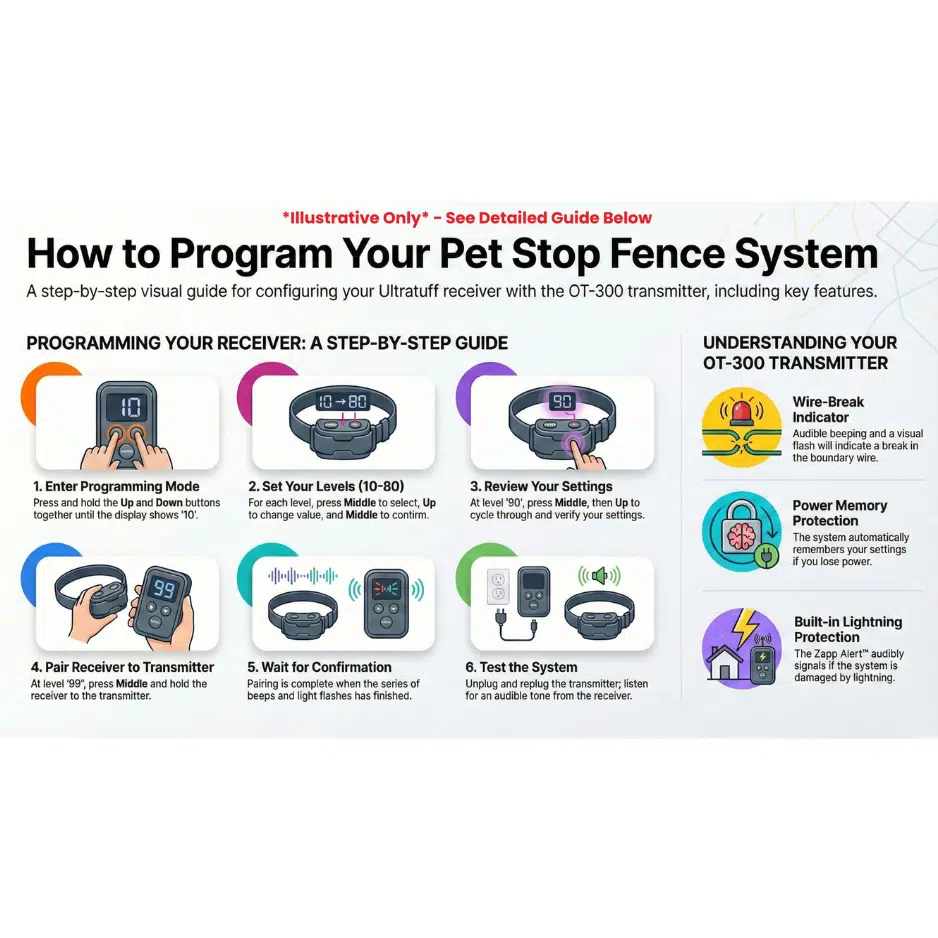
Follow this step-by-step guide to program your Pet Stop® Ultra Tuff receiver collar using the OT-300 transmitter. This process ensures your collar is set up properly to work with your underground pet fence system.
Find more answers to your questions at our Pet Fence Canada Help Desk
BEFORE YOU BEGIN
Make note of the number currently displayed on your OT-300 transmitter — you’ll see it again when programming is finished.
PROGRAMMING STEPS
- Enter Programming Mode:
Press and hold both the top and bottom buttons at the same time. When the display shows “10”, you’re in programming mode. - Menu Overview:
You’ll work through categories in order: 10, 20, 30… up to 80. Each category lets you adjust specific settings, and every step begins and ends with the middle button.
CATEGORIES & SETTINGS
- Frequency (Category 10)
- Press the middle button → display shows 11
- Press the top button twice until it shows 13
- Press the middle button to set → moves to 20
Pro Tip: For boundaries > 2000 ft, select 14.
- Warning Time (Category 20)
- Press the middle button → display shows 21
- Press the top button once until 22
- Press middle button to set → moves to 30
Warning Time Options:
- 21 – No warning
- 22 – 1/2 second warning
- 23 – 1 second warning
- 24 – 2 second warning
- Stimulation Level (Category 30)
- Press the middle button → 31
- Press the top button three times until 34
- Press middle button to set → moves to 40
Stimulation Level Options:
- 31 – Low
- 32 – Medium-Low
- 33 – Medium-High
- 34 – High
- 38 – No Shock
- 39 – Puppy Mode Engaged (See Category 80)
- Progressive Duration (Category 40)
- Press the middle button → 41
- Press middle button to set → moves to 50
- Battery Saving (Category 50)
- Press the middle button → 51
- Press the top button once to 52
- Press middle button to set → moves to 60
- Modulation (Category 60)
- Press the middle button → 61
- Press middle button to set → moves to 70
- Stopper Mode (Category 70)
- Press the middle button → 71
- Press middle button to set → moves to 80
Stopper Mode Options:
- 71 – Stopper disabled
- 72 – 2 seconds
- 73 – 4 seconds
- 74 – 6 seconds
(Useful for stubborn dogs — delivers continuous correction for selected time.)
- Puppy Training Mode (Category 80)
- Press middle button → 81
- Press middle button to set → moves to 90
Settings range 1–9 for gentle introduction — only triggers if 39 was selected earlier.
REVIEW & PAIR
Review Settings (Category 90)
- Press middle button → display cycles through your settings:
13, 22, 34, 41, 52, 61, 71, 81, 99
Pairing (99)
- When display shows 99, press the middle button — it will start flashing.
- Hold your receiver up to the transmitter.
- When the red light on the receiver comes on, press the middle button on the transmitter to start programming to the collar.
- The collar will beep and flash — when it stops, programming is complete.
Note: If the red light doesn’t come on right away, press middle button to restart flashing and try again.
FINAL CHECKS
- Wait a few minutes — the transmitter will return to its original display number.
- To speed this up, unplug the transmitter and plug it back in.
- Test your receiver:
- Hold it up to the transmitter — it should beep to indicate success.
- As a double-check, walk to the boundary — the collar should beep at the edge of the signal.
